Consolidation settings
Finovio Users Guide / Period close and consolidation / Multi-entity close
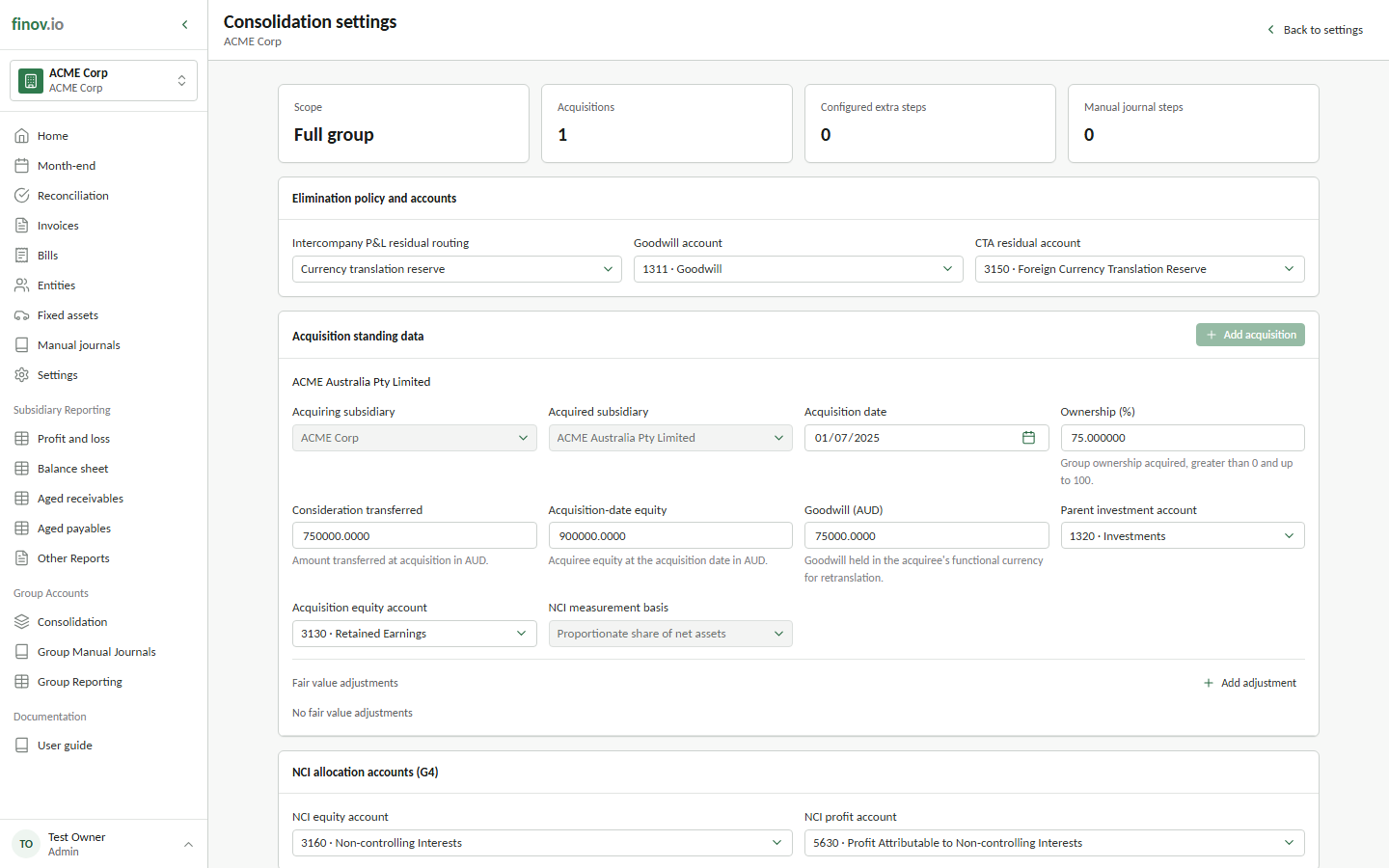
Open Settings → Consolidation on a parent subsidiary to configure the standing data and accounts used by its group close.
Acquisition standing data
Maintain the acquisition details for each child included in the group. The available settings include ownership percentage, acquisition date, consideration, opening NCI, pre-acquisition reserves, and fair-value adjustments. Keep these values aligned with the approved acquisition accounting records.
Acquisition settings drive qualifying investment eliminations and NCI drafts. Saving a setting does not post a journal by itself; the consolidation checklist creates previews for the selected period.
Posting accounts
Select the accounts used for consolidation adjustments, including the NCI equity and NCI profit accounts. The translation step also requires an appropriate OCI account category for the foreign currency translation reserve.
Complete account mappings before starting the close. A missing required account blocks the affected preview rather than choosing an account automatically.
Additional consolidation steps
Add a Manual journal task when the close requires a posted group adjustment, or a Confirmation task for off-system work. Additional tasks configured on parent subsidiaries within the ownership tree are included in the full-group checklist.
Use clear task names that describe the accounting evidence or adjustment. Confirmation tasks record completion; they do not create ledger entries.