Non-controlling interest
Finovio Users Guide / Period close and consolidation / Multi-entity close
For a subsidiary that is not wholly owned, the NCI step allocates the minority owners' share in the group consolidation ledger.
Required setup
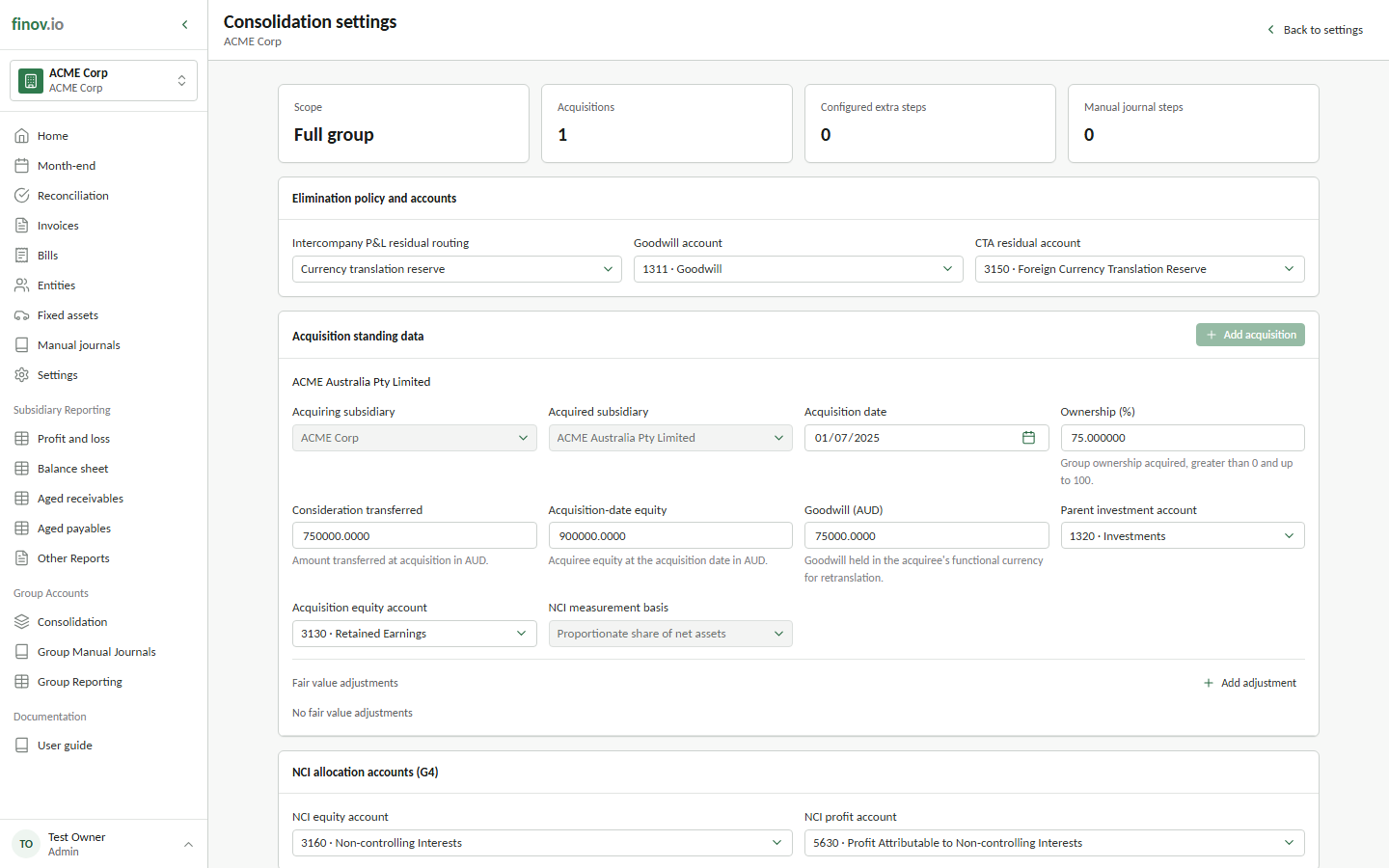
Open Settings → Consolidation on the parent subsidiary. For each acquisition, maintain the ownership percentage, acquisition date, opening NCI amount, and relevant investment and equity details. Select the group NCI equity and NCI profit accounts before running the close.
Finovio uses this standing data; it does not infer ownership from journal balances.
Preview the NCI journals
The NCI checklist row becomes available after elimination and any configured additional steps. Open Post NCI journals to review the draft for each partially owned subsidiary.
The production calculation covers the configured opening NCI position and the minority share of current-period profit or loss. Review the ownership percentage, source profit or loss, destination accounts, and draft amount before posting.
Wholly owned subsidiaries do not produce an NCI journal. If no allocation is required, the step can complete without a posted journal.
Post or redo NCI
Select Post NCI journals to write the drafts to the consolidation ledger. Before the group lock, use Remove and redo to remove generated NCI journals, correct the acquisition settings or earlier group results, and run the preview again.