Asset types and defaults
Finovio Users Guide / Fixed Assets
Asset types are the defaulting engine for the fixed asset register. Set them up before you add your first asset.
In this guide
- Choosing an asset type
- Defaults applied to an asset
- Accounting mappings
- Depreciation policy
- Override controls
- Changing an asset type
Choosing an asset type
Open Fixed assets, select New asset, and choose an Asset type. The list contains the types configured for the active subsidiary. Asset type is required before the draft can be saved.
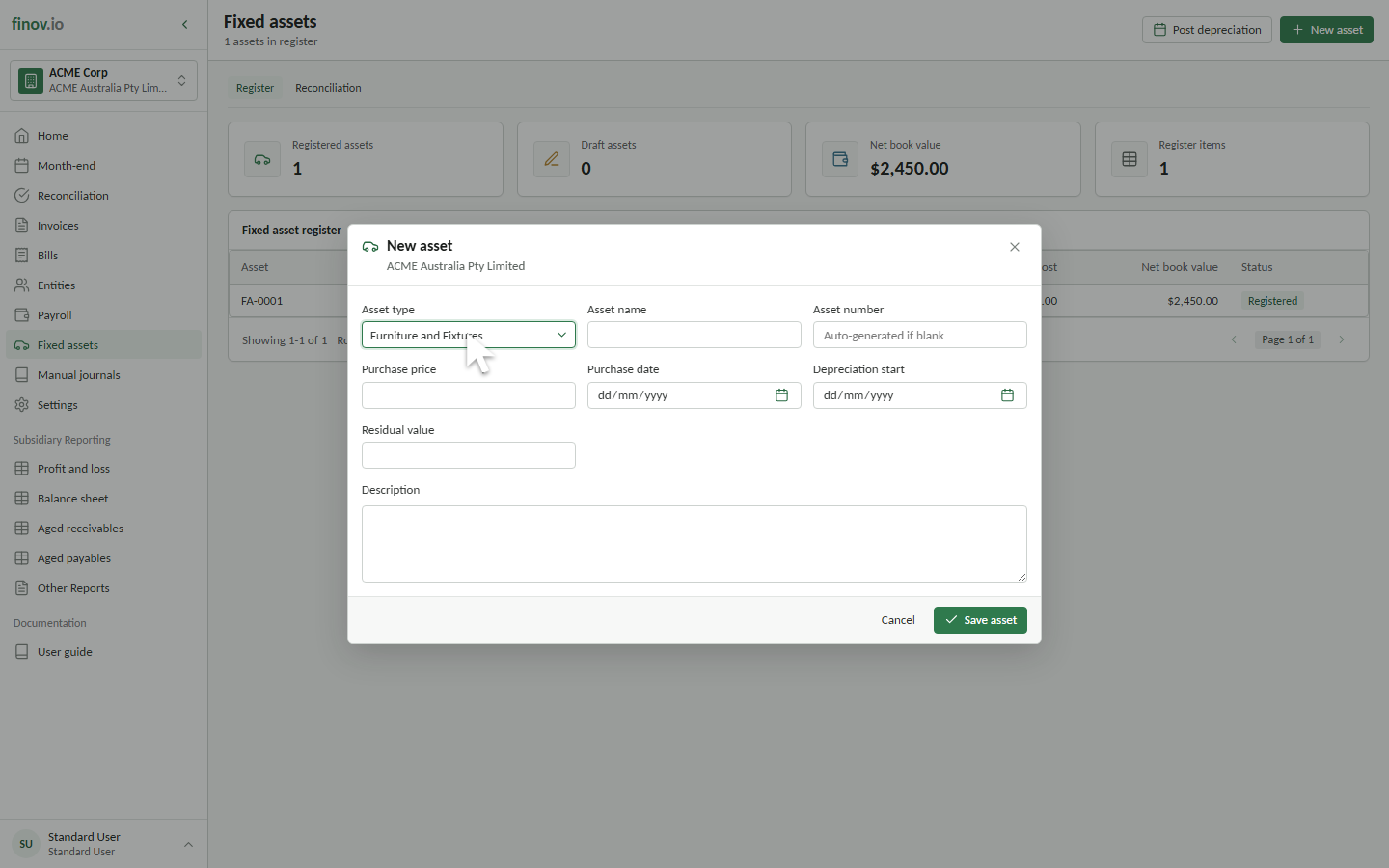
The customer portal does not currently include a separate Asset Types page. Contact your Finovio support contact when a type needs to be added or its policy needs to change.
Defaults applied to an asset
When you save a new draft, Finovio copies the selected type's accounting and depreciation settings onto the asset. This keeps assets in the same class consistent and preserves the policy saved with each asset.
The New asset form asks only for the asset-specific information:
- Asset name and optional asset number.
- Purchase price and purchase date.
- Depreciation start date.
- Residual value.
- Description.
Leave the asset number blank when Finovio should allocate the next FA-0001-style number. Enter a residual value when this asset should stop depreciating above zero. If you leave it blank, the type's default is saved with the asset.
Accounting mappings
An asset type can provide these ledger mappings:
| Mapping | How it is used |
|---|---|
| Asset account | Holds the asset's capitalized cost. |
| Accumulated depreciation | Receives the credit from monthly depreciation journals. |
| Depreciation expense | Receives the debit from monthly depreciation journals. |
| Disposal gain | Receives a gain when disposal proceeds exceed the asset's carrying position. |
| Disposal loss | Receives a disposal loss and eligible disposal costs. |
| Private use | Identifies the account reserved for private-use treatment. Current depreciation journals still post the full amount to depreciation expense. |
Depreciable types require valid accumulated depreciation and depreciation expense accounts. The mapped accounts must belong to the same subsidiary.
Depreciation policy
The type also determines whether its assets depreciate and can supply:
- Depreciation method, such as straight line or diminishing value.
- Averaging method, such as a full-month convention.
- Depreciation rate or effective life.
- Cost limit and initial deduction percentage where applicable.
For example, a type can use diminishing value with a full-month convention, while another can use straight line. Assets without the required depreciation accounts are not included in a depreciation calculation.
Override controls
Each type can independently allow or prevent overrides to:
- Depreciation rate or effective life.
- Ledger accounts.
- Residual value.
- Private-use percentage.
When an override is blocked, an asset must follow the type policy. These controls prevent individual assets from silently departing from the accounting treatment approved for their class.
Changing an asset type
A draft asset can be edited before registration. Selecting a different type applies that type's defaults when the draft is next saved, subject to its override controls.
After registration, Finovio does not silently rewrite prior depreciation assumptions. Changes are made through explicit asset adjustments so the effective date and history remain traceable. See Adjusting an asset.